Planning to build and launch your own unity mobile game? Shipping a great unity game mobile project on Android and iOS requires balancing visual polish, responsive touch controls, and rock-solid performance across hundreds of diverse phone models. In this guide, we break down the practical lessons our studio uses to take a mobile project from a rough prototype to a certified store launch.
Whether you are targeting casual gamers or building a stylized 3D world, here is how to navigate mobile game development without hitting device crashes or thermal throttling.
The problem
Building a game on a high-end development PC creates a dangerous illusion of endless hardware power. When you first deploy that project onto an actual budget smartphone, reality hits immediately:
- Aggressive thermal throttling: A phone running at 100% capacity heats up within 3 minutes, forcing the mobile operating system to throttle CPU and GPU clock speeds by 40% or more.
- Severe memory limits: Unlike PCs with virtual paging, mobile operating systems (especially Android) aggressively kill background and foreground applications that exceed their assigned memory threshold (often as low as 1 GB on budget devices).
- Fill-rate bottlenecks: Mobile chipsets use tile-based deferred renderers (TBDR). Heavy multi-pass shaders, excessive alpha transparencies, and full-screen post-processing effects rapidly exhaust mobile memory bandwidth.
- Input friction: Mouse clicks do not translate directly to mobile screens. Touch controls require forgiving hitboxes, dead zones, and immediate visual feedback.
To maintain a responsive 60 FPS experience, your entire frame must execute in under 16.6 milliseconds. But on phones, spending the full 16.6 ms leads to rapid device heating. You actually need a thermal safety buffer:
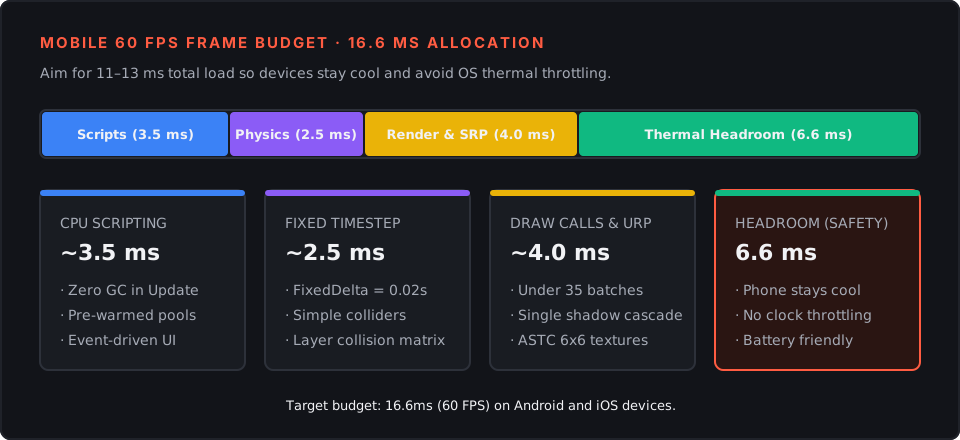
When we develop prototypes for our games, our primary benchmark is never our desktop workstation—it is a three-year-old budget Android phone. If a game cannot hold a steady frame rate on mainstream hardware, players simply uninstall and leave negative reviews.
What we tried
During our early mobile production cycles, we tested several approaches to balance fidelity with frame rate.
Initially, we left Unity’s default render settings untouched and attempted to optimize later. That was a mistake: default settings are often tuned for generic desktop workflows rather than mobile architecture. We saw draw calls spike over 180 per frame, memory footprint hover near 1.8 GB, and frame rates jitter between 25 and 45 FPS.
To diagnose the bottlenecks, we connected the Unity Profiler and Frame Debugger over ADB (Android Debug Bridge). Three major culprits appeared:
- Uncapped frame delivery and default 30 FPS limits: Unity defaults to 30 FPS on mobile unless explicitly overridden, leading to choppy touch responsiveness.
- Garbage collection allocations in the update loop: String concatenations and repeated UI text formatting triggered GC pauses every 4 seconds.
- Uncompressed textures and unbatched meshes: Every separate mesh and material triggered an independent SetPass call.
We compared our unoptimized baseline against our tuned mobile pipeline:
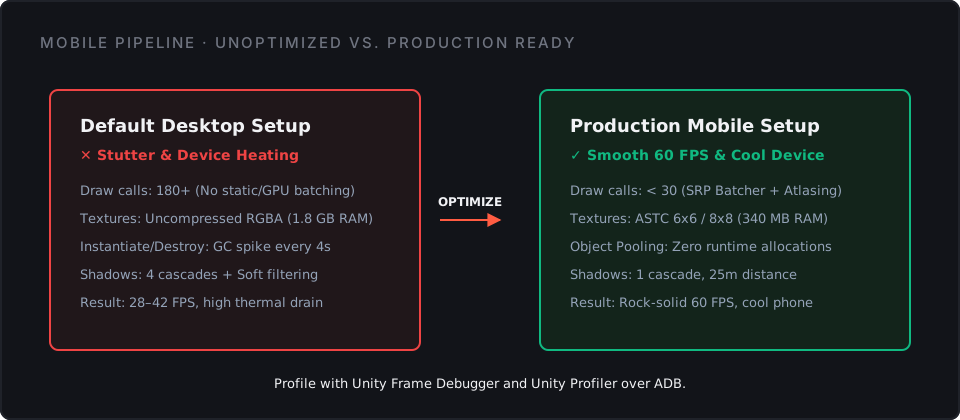
To lock frame pacing and prevent mobile devices from sleeping during gameplay, we implemented a dedicated bootstrapper script:
using UnityEngine;

public class MobilePerformanceBootstrapper : MonoBehaviour
{
    [SerializeField] private int targetFPS = 60;

    void Awake()
    {
        // Disable screen dimming during gameplay
        Screen.sleepTimeout = SleepTimeout.NeverSleep;

        // Mobile ignores QualitySettings.vSyncCount; set frame rate explicitly
        Application.targetFrameRate = targetFPS;
    }
}
We also overhauled our asset pipeline, converting all environment textures to ASTC block compression and grouping UI sprites into shared atlases. You can read our detailed breakdown in our Unity mobile optimization guide.
What worked: Core rules for your unity game mobile
Through successive mobile sprints and client deliverables, we established a strict production standard that keeps our mobile builds lightweight, responsive, and cool-running.
1. Adopt the Universal Render Pipeline (URP) with mobile profiles
URP is essential for modern mobile game development. In your mobile URP asset:
- Set Render Scale to
0.85or0.90on lower tiers—the resolution difference is imperceptible on high-DPI screens, but cuts pixel shading load significantly. - Disable HDR and MSAA on budget profiles, relying on fast FXAA instead.
- Keep Shadow Distance tight (typically 20–35 meters) with a single shadow cascade.
- Turn off Opaque Texture and Depth Texture passes unless a specific shader effect requires them.
2. Enforce zero per-frame memory allocation
Garbage collection on mobile freezes the main thread. To avoid micro-stutters:
- Use Object Pooling for bullets, enemy spawns, damage popups, and audio sources.
- Avoid LINQ statements and
foreachloops inUpdate()cycles. - Cache component references in
Awake()orStart()rather than callingGetComponent<T>()at runtime.
3. Compress all textures to ASTC
Textures constitute the largest portion of your mobile build and runtime RAM:
- Use ASTC 6x6 or 8x8 for environment props, terrain, and background elements.
- Reserve ASTC 4x4 only for crisp UI elements and player character models.
- Always check the official Unity mobile optimization documentation to align with recommended platform compression standards.
4. Optimize UI canvases for draw call batching
Mobile UI often generates more draw calls than the 3D scene itself:
- Split dynamic UI (health bars, timers) and static UI (background panels, frames) into separate sub-canvases. When a single element changes, only its sub-canvas regenerates.
- Ensure all icons and buttons on a screen share a single Sprite Atlas.
5. Validate realistic development budgets early
Technical excellence must align with production realities. If you are budgeting an indie mobile release or seeking co-development support, review our breakdown on mobile game development costs to structure your milestones effectively.
Frequently asked questions: unity mobile game and unity game mobile
Can I play Unity games on mobile?
Yes, Unity is the leading game engine for mobile platforms. Over 70% of the world’s top mobile games run on Unity. Players can download and play Unity-powered games seamlessly through Google Play, Apple App Store, or web-based mobile browser builds.
Is Unity good for 3D games?
Yes. Unity’s Universal Render Pipeline (URP) is specifically designed for mobile 3D games. It enables indie developers and large studios alike to render stylized or realistic 3D environments with dynamic lighting, physics, and smooth 60 FPS performance without draining battery life.
What mobile games use Unity?
Many of the highest-grossing and most popular games globally are built on Unity, including Pokémon GO, Genshin Impact, Call of Duty: Mobile, Monument Valley, Subway Surfers, and Marvel Snap.
Can I run Unity on iOS?
Yes. Unity provides end-to-end support for iOS. When you build for iOS, Unity generates an Xcode project that you compile directly to run on iPhone, iPad, and Apple Silicon devices, with complete access to Apple Metal graphics, In-App Purchases, and Game Center.
What’s next
Building an engaging unity mobile game is a marathon of rapid prototyping, aggressive performance profiling, and iterative playtesting. By setting strict draw call limits, tuning your render pipeline early, and designing with mobile touch constraints in mind, you can deliver an experience players love to keep installed.
Ready to see how we build responsive, player-first experiences? Explore our games to see our work in action, or start a project with our studio if you need an experienced development team to bring your mobile game concept to life.